Zeiss LSM 910 Alexandria East 349A -WARNING: If you do not swipe your ID for 30 days, building access will be turned off.
S/N ??
As of 20 Nov 2026, this is an upgrade to the previous LSM800. This upgrade includes new 63x and 10x objective lenses, LED instead of Hg lamp for widefield fluorescence, and Airyscan for twice the spatial resolution.
Advance scheduling:
https://nyumc.ilab.agilent.com/schedules/498939#/schedule/
Upright microscope with 2 GaAsP detectors and motorized stage.
DO NOT SATURATE IMAGES TO AVOID DAMAGING DETECTORS!!
Lenses:
63x/1.4 oil DIC Plan-Apochromat (new in late 2026)
63x/1.3 multi-immersion Plan-neofluor DIC adjustable collar must be set depending on immersion media
40x water dipping
20x/0.75 or 0.80 Plan apochromat may be on the instrument for better spectral registration ??
10x/0.45 (? plan apochromat?)
Lenses are changed manually by turning them by hand.
{Lenses need to be confirmed}
Lasers:
405 nm
488
561
640
Detectors:
2 @ GaAsP and 1 Airyscan
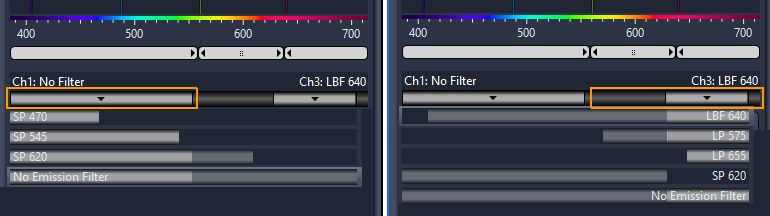
Filters available:
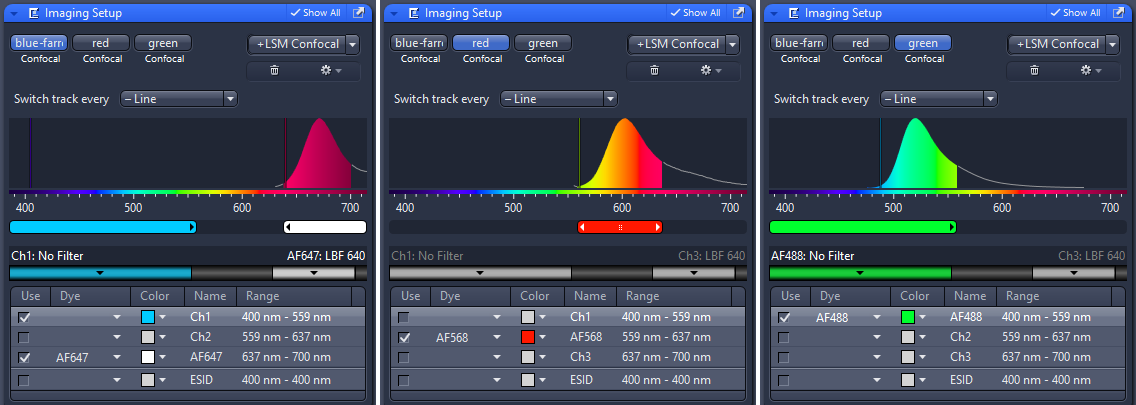
Example settings for four standard confocal channels where blue is much brighted than green.
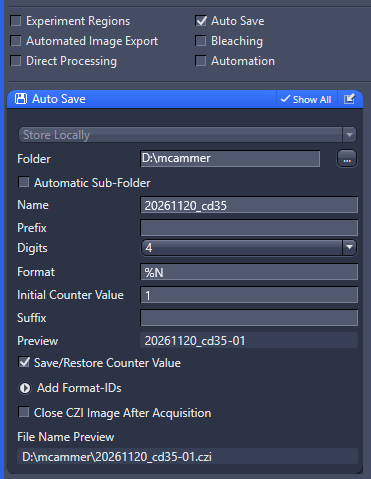
If you use autosave, make sure to set the path and filename correctly before scanning!
Example of suggested autosave settings:
Automatic Sub-Folder unchecked (unless you want a mess of folders).
Don't use periods . in the file name.
Make sure the folder is your data folder on Drive D:, not drive C:
We highly recommend saving files directfly to the hard drive D: during imaging and then copy to a server afterwards.
Saving directly to a server will slow down imaging and, if anything goes wrong with the internet connection, may crash the system.
Do not mount a server as a drive.
You may connect to the server using a protocol such as research-cifs.
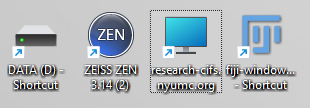
Zen 3.14 (Zen Blue versions may vary slightly and are significantly different than Zen Black).
If you need an explanation how to use the 63X lens to achieve full resolution, please ask Michael or Yan.
In brief:
General Confocal Best practices:
Highly recommended reading: Tutorial: guidance for quantitative confocal microscopy
To open CZI files, older versions of Fiji and BioFormats may not work.
You may need ImageJ 1.54u8 and BioFormats 8.4.0 or more recent.